
Choosing a VPN for your Android phone should not mean sacrificing your privacy, battery life, or internet speed. The best VPN for Android should protect your connection, explain how it handles your data, and provide an app that is simple enough to use every day.
Some VPN apps offer unlimited free data, while others provide more server locations, streaming support, and advanced security features through paid subscriptions. However, a free download does not automatically mean a service is trustworthy. A VPN provider can potentially see information about your connection, so its privacy policy matters as much as its encryption.
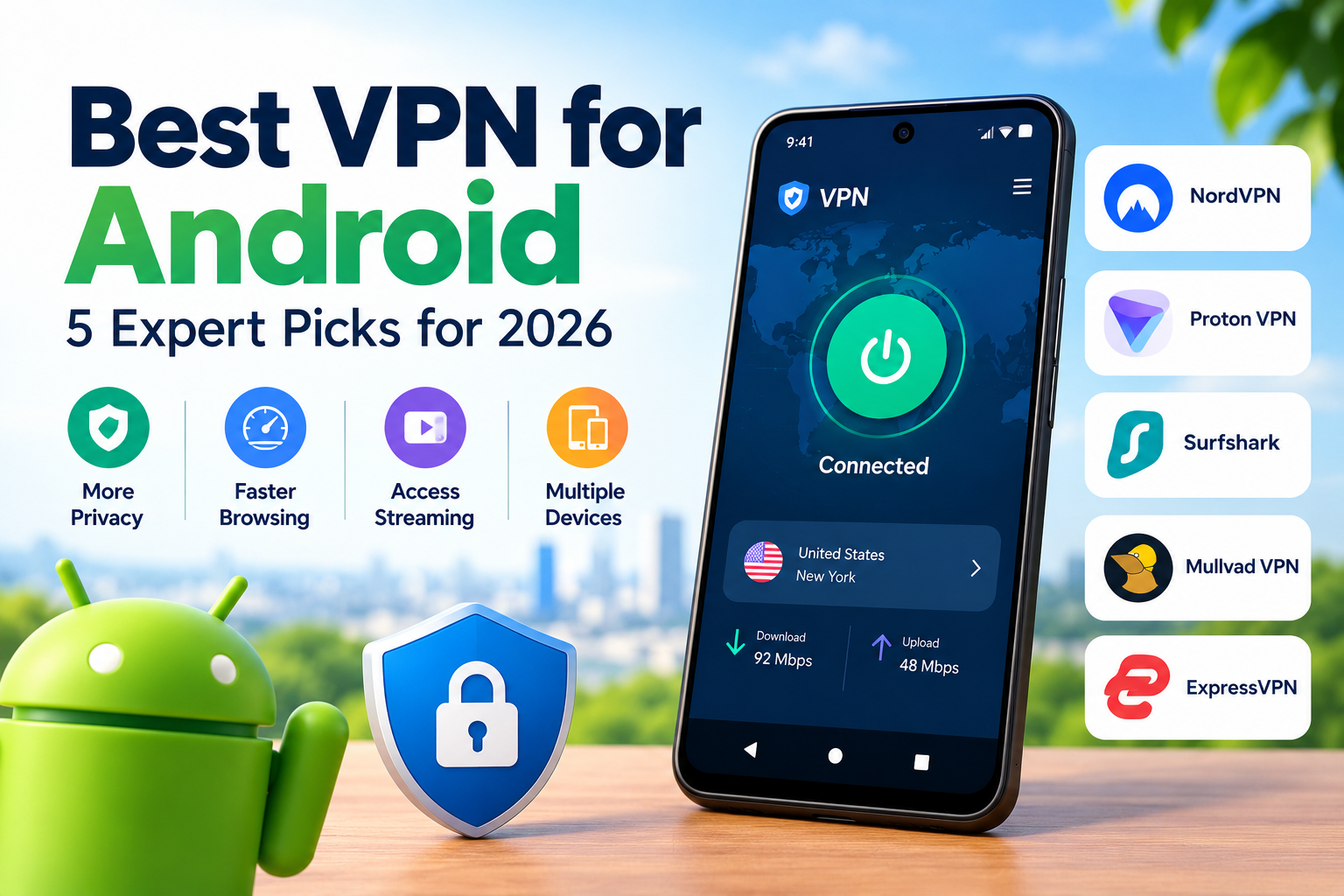
This guide compares five established options: NordVPN, Proton VPN, Surfshark, Mullvad VPN, and ExpressVPN. It explains which services suit everyday browsing, public WiFi, streaming, and privacy focused users in the United States.
Key Takeaways
- Best overall: NordVPN for a broad set of security and everyday features.
- Best free option: Proton VPN for unlimited free data without advertising.
- Best for multiple devices: Surfshark for users who want to protect several devices under one subscription.
- Best for privacy focused users: Mullvad VPN for its privacy centered account approach.
- Best for beginners: ExpressVPN for a straightforward app experience.
In this guide, you will learn how VPN apps work, how to compare prices and privacy features, how to set up a VPN on Android, and which option fits your needs. Use the table of contents to jump to the section that matters most.
What Is the Best VPN for Android?
The best VPN for Android depends on your budget, privacy needs, and intended use. NordVPN is a strong all around option, Proton VPN is a good starting point for free protection, and Mullvad deserves consideration if minimizing account information is a priority.
A Virtual Private Network (VPN) is defined as a service that creates an encrypted connection between your device and a VPN server. This connection helps prevent people on the same unsecured network from easily reading your internet traffic and replaces your public IP address with the server’s IP address for much of your internet activity.
A VPN does not make you completely anonymous. Websites can still identify you through account logins, cookies, browser fingerprinting, and other tracking methods.
Which VPN should you choose?
Use these recommendations as a starting point:
- NordVPN: Best for users seeking a balance of privacy, speed, and extra security features.
- Proton VPN: Best for users who need a free plan with unlimited data.
- Surfshark: Best for households and individuals connecting multiple devices.
- Mullvad VPN: Best for users who value privacy focused account creation and straightforward pricing.
- ExpressVPN: Best for people who prefer a simple interface and a familiar connection process.
Independent testing from RTINGS, updated in October 2026, selected Mullvad as its leading Android VPN, illustrating that different reviewers can reach different conclusions based on their priorities. TechRadar’s 2026 VPN comparison selected NordVPN as its best overall service. These differences are a reason to evaluate specific features rather than treating any ranking as universal.
Why Use a VPN for Android in 2026?
A VPN can improve connection privacy on public WiFi, reduce the visibility your internet provider has into your browsing traffic, and help you use a different apparent IP address. It cannot replace secure websites, software updates, strong passwords, or sensible privacy settings.
How does a VPN protect your Android phone?
A VPN encrypts traffic between your Android device and the VPN server. Your internet provider can generally see that you are connecting to a VPN, along with connection timing and data volume, but should not be able to read the contents of properly encrypted VPN traffic.
The VPN provider becomes an important part of the trust relationship because it handles your traffic as it leaves the encrypted tunnel. Choose a provider with clear data handling practices, reliable security features, and independent scrutiny of its privacy claims.
Is a VPN useful on public WiFi?
Yes. A VPN adds a layer of protection when you connect to public WiFi at airports, hotels, libraries, and coffee shops.
Modern websites already use HTTPS encryption, so a VPN is not a substitute for secure website connections. It can still help protect traffic from local network observers and reduce the amount of browsing information exposed to your internet provider.
What can a VPN not protect you from?
A VPN does not automatically stop phishing, malicious downloads, account theft, or tracking through websites where you are signed in.
According to Google’s Android privacy guidance, Android provides a Privacy Dashboard and permission controls that let users review and manage access to sensitive information. A VPN and Android’s built in privacy tools address different risks, so use both.
Android privacy and permissions →

How to Set Up a VPN on Android
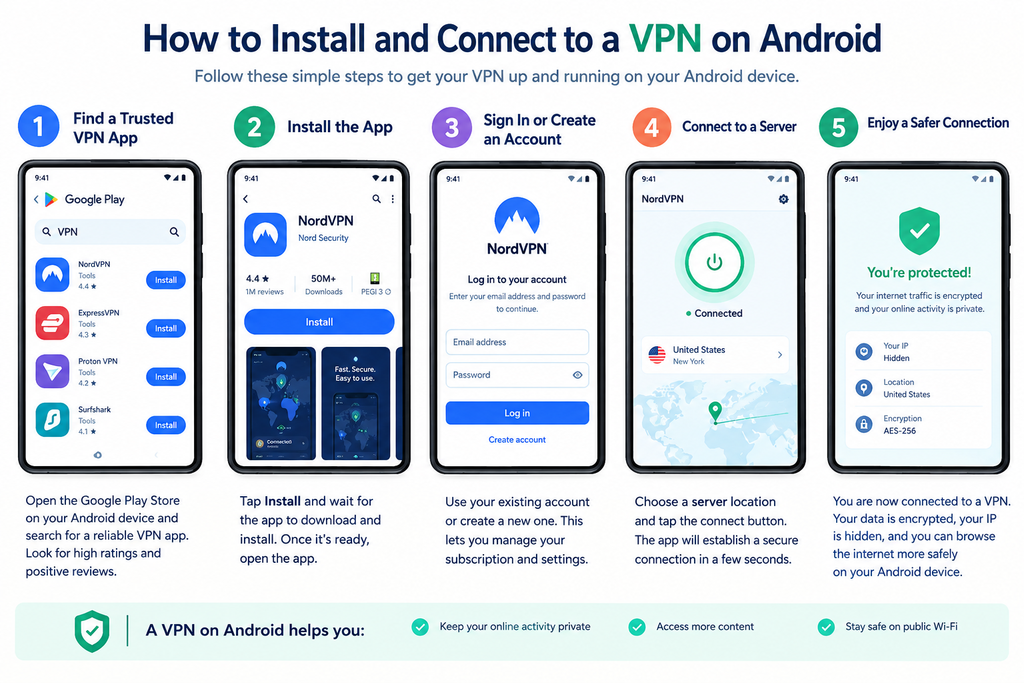
Setting up a VPN on Android usually takes only a few minutes. You can install a provider’s official app, approve the Android VPN connection request, and select a server.
Step by step Android VPN setup
- Choose a reputable provider. Compare its privacy policy, free or paid plan, security features, and refund terms.
- Download the official app. Use Google Play or the provider’s verified official website. Avoid unfamiliar APK download pages.
- Create an account if required. Some providers require an account, while Mullvad is known for an account system that does not require an email address.
- Open the app and connect. Select Quick Connect or choose a suitable server location.
- Approve the connection request. Android displays a system prompt when an app requests permission to establish a VPN connection.
- Check the connection. Confirm that the app shows an active connection and test for IP or DNS leaks if privacy is important to you.
- Enable extra safeguards. Where available, configure the kill switch, automatic connection on untrusted WiFi, or split tunneling to suit your needs.
What should you check after connecting?
Check that your public IP address changes to the VPN server’s address. For more thorough testing, use a reputable IP and DNS leak testing service.
A changed IP address alone does not prove that every traffic path is protected. If you need strong protection against accidental disconnections, review Android’s always on VPN and block connections without VPN settings, where supported by your device and provider.
[IAndroid privacy settings guide →
Best VPN Apps for Android Compared
The five services below serve different needs. This comparison uses published reviews and provider documentation rather than claiming original laboratory speed tests or independently verified TechRivio ratings.
1. NordVPN: Best all around option
NordVPN is a strong choice for users who want a combination of everyday privacy, broad server availability, and extra security features. Its Android app supports modern VPN technology and includes features that vary by subscription and app version.
Consider NordVPN if you use your phone for browsing, travel, and streaming. Review the renewal price carefully because introductory subscription pricing can differ significantly from the regular price.
2. Proton VPN: Best free VPN for Android
Proton VPN is one of the strongest options for users who want a free VPN for Android without a monthly data cap. Its official free plan advertises no ads, no activity logs, and unlimited bandwidth.
The free plan has fewer choices and capabilities than the paid plan, and access to streaming services is not guaranteed. It is a sensible starting point for everyday browsing if you want to avoid a subscription.
3. Surfshark: Best for multiple devices
Surfshark is worth considering if you want one subscription to protect multiple devices, such as your Android phone, tablet, and laptop. It offers additional privacy and security features, depending on the plan.
Check the current device policy, available server locations, and renewal cost before paying. It may offer good value for households, but the cheapest advertised monthly price usually requires a longer initial subscription.
Official website: https://surfshark.com/
4. Mullvad VPN: Best for privacy focused users
Mullvad places a strong emphasis on privacy and uses an account number system that allows users to sign up without supplying an email address. Its Android app uses WireGuard, a modern VPN protocol.
Mullvad is particularly suitable for people who prioritize privacy over entertainment features. Its approach to streaming access is less focused on consistently bypassing streaming service restrictions.
5. ExpressVPN: Best for beginners
ExpressVPN is an option for users who prefer a straightforward mobile interface and a simple connection process. It provides Android support and paid subscriptions, with available features depending on the current plan.
It may suit people who want a premium service without spending much time adjusting settings. Compare its current subscription cost with other providers before making a decision.
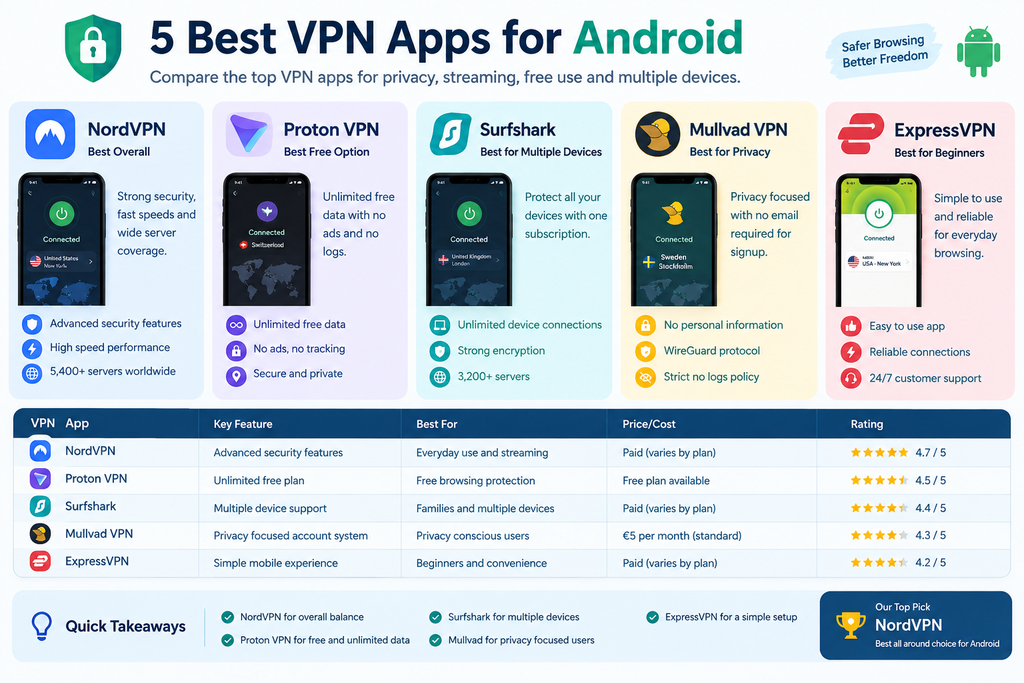
Best VPN for Android comparison: Top options at a glance
| Option name | Key feature | Best for | Price or cost | Editorial rating |
|---|---|---|---|---|
| NordVPN | Broad security feature set | Everyday use and streaming | Paid; varies by plan | Strong all round pick |
| Proton VPN | Unlimited free plan | Free browsing protection | Free plan available | Strong free pick |
| Surfshark | Multiple device support | Families and multiple devices | Paid; varies by plan | Strong value candidate |
| Mullvad VPN | Privacy focused account system | Privacy conscious users | €5 per month standard price; verify current terms | Strong privacy pick |
| ExpressVPN | Simple mobile experience | Beginners and convenience | Paid; varies by plan | Strong beginner option |
Winner: For most people who want a paid, all around service, NordVPN is a sensible starting point. For users who do not want to pay, Proton VPN is the clearest first option. Privacy focused users should also compare Mullvad before deciding.
These are editorial recommendations, not laboratory performance scores. Subscription prices, promotions, taxes, and renewal terms can change. Check official pricing pages before purchase.
Which VPN is best for streaming?
NordVPN, Surfshark, and ExpressVPN are worth comparing if streaming is your main goal. Streaming platforms regularly change how they identify VPN connections, so no provider can guarantee that every service will work from every server.
Which VPN is best for free browsing?
Proton VPN is a strong choice because its official free plan offers unlimited bandwidth without ads. If you mainly browse websites, read news, and use public WiFi, this may be enough without paying for premium features.
How to Choose a Secure VPN for Android
A secure VPN for Android should offer strong encryption, modern protocols, clear privacy terms, and practical safeguards against connection failures. Marketing claims alone are not proof of security.
Check the VPN’s privacy policy
Look for a clear explanation of whether the provider stores browsing activity, connection timestamps, IP addresses, device information, or diagnostic data. A no logs claim should explain what is excluded from logging and whether independent audits support that claim.
A privacy policy is useful, but it is not equivalent to an independent security assessment. Give greater weight to providers that publish detailed audit reports and explain their scope.
Look for modern protocols and a kill switch
WireGuard and OpenVPN are established VPN protocols used by reputable providers. WireGuard is often chosen for its relatively simple design and efficient performance, while OpenVPN remains widely supported.
A kill switch helps prevent internet traffic from continuing outside the VPN tunnel if the connection drops. Support and behavior can differ by app and Android version, so check the provider’s documentation.
Use the CLEAR selection framework
The CLEAR VPN Framework is a practical checklist for comparing Android VPNs. It is an editorial decision aid, not a scientifically validated rating system.
- C: Clarity. Is the privacy policy understandable?
- L: Logging. Does the provider explain what it records and publish audit evidence?
- E: Encryption. Does the app support established protocols and secure connections?
- A: Android controls. Does it offer a kill switch, auto connect, and useful mobile settings?
- R: Real value. Do the price, server options, and features match your actual needs?
Score each category from zero to two based on available evidence. A total of eight to ten suggests a promising candidate, while a low score means you should investigate further. Missing evidence should count against a provider rather than being treated as proof of safety.
Pro Tip: Do not judge a VPN by speed alone
A fast VPN with unclear data practices may be a poor privacy choice. A more useful comparison combines privacy evidence, connection reliability, mobile usability, and cost.
Google Play’s VPN policy requires apps using Android’s VPN service to disclose relevant use, encrypt traffic between the device and VPN endpoint, and follow applicable user data policies.
Google Play VPN service policy →
Common VPN Mistakes to Avoid
The most common VPN mistakes involve trusting unknown free apps, misunderstanding anonymity, and ignoring subscription terms. Avoiding these errors can improve both your privacy and your overall experience.
Assuming every free VPN is safe
A free VPN is not automatically dangerous, and a paid VPN is not automatically trustworthy. The important questions are how the company funds its service, what information it collects, and whether its claims can be checked.
Prefer a provider with a clear business model and transparent privacy documentation. Be cautious when an app makes broad promises but gives little information about its operator or data practices.
Expecting complete anonymity
A VPN changes your apparent IP address and encrypts the connection to its server, but it does not erase your digital identity. Websites may still recognize you through cookies, browser fingerprints, accounts, or information you submit.
Use a VPN alongside unique passwords, multifactor authentication, browser privacy controls, and software updates.
Forgetting subscription renewals
A low introductory price may apply only to a long first term. Before purchasing, check the billing period, renewal price, refund window, and cancellation process.
Installing apps from unknown websites
Avoid unofficial APK files and cloned VPN apps. Verify the developer’s identity, review the app’s permissions, and use the provider’s official download page.
Android’s permission controls let you review access to sensitive information. A conventional VPN should not need unrestricted access to your contacts, photos, or microphone merely to establish a VPN tunnel.
How to protect your Android phone from online threats →
Frequently Asked Questions
What is the best VPN for Android in 2026?
NordVPN is a strong all around option for Android users who want a paid service with broad security features. Proton VPN is a good free alternative, while Mullvad is worth considering for privacy focused use. The best choice depends on whether you prioritize streaming, unlimited free data, multiple devices, or minimizing the personal information required to create an account.
How does the best VPN for Android protect my privacy?
A VPN encrypts traffic between your Android phone and its VPN server, helping protect it from local network observers. It also replaces your public IP address with the server’s address for much of your internet activity. The provider still becomes a party you must trust, so check its logging policy and independent audits. A VPN does not prevent every type of online tracking.
Why is a VPN useful on Android?
A VPN is useful when you want extra privacy on public WiFi, less exposure of browsing traffic to your internet provider, or a different apparent IP address. It can also help when traveling and accessing services available in another region, subject to local laws and service restrictions. A VPN does not replace HTTPS, device security updates, or safe browsing habits.
Is the best VPN for Android worth paying for?
A paid VPN can be worth the cost if you need more server choices, reliable streaming access, additional security features, or support for several devices. However, casual users may find a reputable free plan sufficient. Proton VPN offers a free plan with unlimited data, making it a reasonable starting point. Compare features and renewal prices before deciding.
What are the best free VPN apps for Android?
Proton VPN is a leading free option because its official free plan offers unlimited data and no advertising. Other free providers may impose monthly data caps, limit server selection, or restrict streaming access. Before installing any free VPN, read its privacy policy and confirm who operates it. Avoid choosing an app simply because it advertises unlimited access.
How much does the best VPN for Android cost?
The cost ranges from free to a paid subscription that may be billed monthly or annually. Proton VPN has a free plan, while paid providers such as NordVPN, Surfshark, and ExpressVPN change their prices according to subscription length and promotions. Mullvad lists standard pricing separately from many introductory offers. Check each provider’s official checkout page for current prices and renewal terms.
What is the difference between a VPN and a proxy?
A VPN typically creates an encrypted tunnel for traffic routed through the VPN connection, potentially covering many apps on your phone. A proxy generally forwards selected application traffic and may not encrypt it. The exact behavior depends on the product. For Android wide connection protection, choose a reputable VPN app and verify which traffic it routes through the tunnel.
Can the best VPN for Android help on public WiFi?
Yes, a reputable VPN can add protection on public WiFi by encrypting traffic between your phone and its VPN server. This reduces the ability of other people on the local network to inspect that traffic. Always use HTTPS websites and avoid suspicious downloads. A VPN cannot stop phishing pages or protect an account if someone steals your password.
Does a VPN make my Android phone completely anonymous?
No, a VPN does not make your Android phone completely anonymous. Websites can still identify you through signed in accounts, cookies, browser fingerprinting, and information you share. Your VPN provider may also collect some connection or account information according to its policy. Use a VPN as one part of a broader privacy strategy rather than a guarantee of anonymity.
Which VPN protocol should I use on Android?
WireGuard is a strong default for users who want a modern, efficient VPN protocol. OpenVPN is another established option with broad support. The best choice depends on your provider, network conditions, and security needs. Use the provider’s recommended secure settings unless you have a clear reason to change them, and keep the VPN app updated.
Conclusion
The best VPN for Android is the one that matches your privacy needs, budget, and daily habits without making unrealistic promises. NordVPN is a strong all around paid option, Proton VPN is an excellent place to start for free protection, and Mullvad is worth a closer look if privacy focused account creation matters most.
Before subscribing, compare logging policies, security features, server availability, and renewal prices. Remember that a VPN protects one part of your online activity, not your entire digital identity.
Next Steps
- Compare the official plans for NordVPN, Proton VPN, and Mullvad.
- Install your chosen app from a verified source and test the connection.
- Review Android permissions, enable available connection safeguards, and keep your phone updated.
For more practical technology advice, explore TechRivio’s Android security and privacy guides.
Disclaimer
The information in this article is provided for educational and informational purposes only. TechRivio does not own, operate, or represent any of the VPN services mentioned in this guide. Product recommendations are based on publicly available information and editorial comparison criteria, not on firsthand testing by TechRivio.
VPN features, subscription prices, privacy policies, and service availability may change over time. Readers should verify current details directly with the respective providers before purchasing a subscription. A VPN can improve connection privacy, but it does not guarantee complete anonymity or protection against every online threat. Users are responsible for complying with applicable laws and the terms of the services they access.
TechRivio makes no guarantee of specific security outcomes, streaming access, search rankings, or product performance.
